The Ultimate Blueprint for Seamless CRM & ERP Synchronization
A practical blueprint for connecting CRM and ERP systems, from data ownership and event flows to conflict resolution, security, and business impact.
Key takeaways
- 1Define which system owns each field before designing bidirectional synchronization.
- 2Use real-time events for operational changes and scheduled batches for reporting.
- 3Plan deduplication, conflict resolution, security, and audit trails as part of the integration.
- Published on
Topics


On this page
When a growing business starts feeling operational friction, the root cause almost always comes down to a silent divide between two critical systems: the CRM and the ERP.
Your sales team lives in the CRM, tracking conversations, deals, and customer sentiment. Meanwhile, your finance and logistics teams depend on the ERP to process actual orders, manage inventory, and track cash flow.
When these systems don’t talk to each other in real time, chaos ensues. Sales reps offer discounts to clients with overdue invoices, finance manually re-enters deal details into accounting software, and inventory forecasts turn into educated guesses.
At Direct Software, we engineer production-grade system integrations that eliminate operational silos between pre-sale client data and post-sale execution. Here is how to approach bi-directional CRM-to-ERP synchronization using modern architectural best practices.
For a broader look at integration decisions, read our guide to connecting business systems without replacing everything. For a related example, see how we integrate webshops with ERPs.
1. The Real-World Divide: What Sales Wants vs. What Finance Needs
To build a sync engine that actually works, you first need to understand why CRM and ERP systems view the world differently.
The CRM (Salesforce, HubSpot, Pipedrive) measures momentum. It records what a client intends to buy, potential deal values, and communication threads. It is designed for speed and flexibility.
The ERP (SAP, Dynamics 365, NetSuite) measures reality. It tracks what was actually shipped, billed, paid, and stocked. It is designed for auditability and precision.
"A CRM records promise; an ERP records fulfillment. If your integration doesn't reconcile those two perspectives continuously, you aren't integrating—you're just copying messy data back and forth."
When these platforms remain disconnected, team productivity drops. Sales reps spend hours chasing status updates on customer shipments, while finance teams waste hundreds of hours every quarter manually re-keying invoices and purchase orders.
2. Architecting Bi-Directional Triggers and Data Mapping
Connecting a CRM to an ERP isn't just about dumping fields from one database into another. It requires a clear definition of system ownership and clean mapping protocols.
Mapping Data Hierarchies
Account mapping must handle parent-child relationships seamlessly. A lead converted in HubSpot should trigger the automatic creation of a verified Customer Account in your ERP, preserving contact hierarchies and billing addresses without manual intervention.
Automated Deal-to-Order Conversion
When a deal reaches "Closed-Won" in the CRM, an event should automatically create a Draft Sales Order in the ERP. This triggers automated validation checks (e.g., product SKU verification and tax calculations) before turning the deal into a live order.
Exposing Operational Insights to Sales
In modern integration architecture, data flow isn't one-way. We expose real-time ERP insights—such as remaining credit limits, open invoice balances, and fulfillment status—directly inside the CRM interface. This empowers sales representatives to make informed, credit-aware decisions before pushing a deal across the finish line.
3. Synchronizing Data: Real-Time Events vs. Scheduled Batches
Not all data needs to move at the same speed. Choosing the right sync pattern prevents API rate-limiting issues and unnecessary infrastructure load.
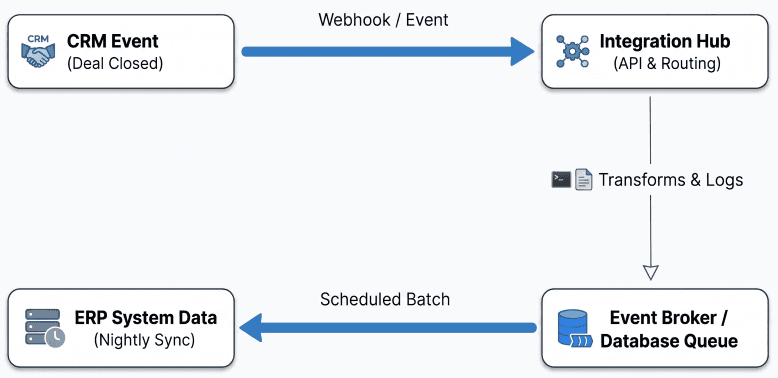
Event-Driven Webhooks (Real-Time)
For mission-critical operations—like converting closed deals into orders or reserving limited inventory—we build event-driven pipelines. Using webhooks and lightweight queue systems (such as AWS SQS or RabbitMQ), system state updates happen in near real-time.
Scheduled Batching (Asynchronous)
For bulk metrics, historical reporting, and daily pipeline snapshots, nightly or hourly batch jobs are far more efficient. Batch processing reduces system overhead and keeps your main API endpoints responsive during peak trading hours.
4. Data Hygiene, Deduplication & Conflict Resolution
Without robust data hygiene protocols, a new integration will simply pollute both systems at twice the speed.
Establishing the Source of Truth
Every field must have a designated system of record:
- CRM as Source of Truth: Primary contact details, initial deal line items, and lead lifecycle stages.
- ERP as Source of Truth: Master SKU lists, tier pricing, payment terms, tax IDs, and credit approval statuses.
"Conflict resolution can't be an afterthought. If a sales rep updates an address in the CRM at the exact same moment finance updates billing details in the ERP, your integration needs deterministic rules to resolve that clash without human intervention."
Smart Matching Logic
To prevent duplicate records, we implement multi-layer matching algorithms. Before creating a new entity, the sync engine checks exact criteria (Tax ID, VAT registration numbers) and fuzzy logic (normalized company names and email domains). If confidence is high, entities merge automatically; if marginal, the transaction flags for review.
5. Enterprise-Grade Security, OAuth2, and Auditability
Integrating core platforms means handing over sensitive financial and customer data. High-standard security architecture is non-negotiable.
- OAuth2 Authentication: We utilize token-based OAuth2 authentication paired with scoped, role-based API permissions. Systems only receive the explicit permissions needed to perform their task.
- Encryption Everywhere: All payload transfers strictly require Transport Layer Security (TLS 1.3), with sensitive customer attributes encrypted at rest in middle-layer staging stores using AES-256 standards.
- Distributed Audit Logging: Every sync operation, transformed payload, and edge-case failure is written to structured, searchable event logs (using OpenTelemetry and centralized log hubs). When a sync anomaly occurs, engineers can trace the exact payload down to the millisecond.
6. Measuring Business ROI: The Impact of a Unified Stack
A clean CRM-to-ERP synchronization pays for itself almost immediately across four key metrics:
| Metric | Disconnected Systems | Unified Integration Stack |
|---|---|---|
| Quote-to-Cash Cycle | Days spent manually transferring records and validating orders. | Reduced to minutes with automated order creation. |
| Data Accuracy | High error rate due to manual data re-entry. | Near zero error rate across billing and shipping data. |
| Demand Forecasting | Lagging indicators based on outdated inventory exports. | Real-time visibility into incoming pipeline demand. |
| Margin Control | Discounts approved without credit visibility. | Automated credit checks before deal signatures. |
Build Your Unified System Infrastructure
A successful CRM and ERP integration isn't just a technical achievement—it's a fundamental business upgrade. By replacing manual entry with resilient, event-driven pipelines, your business gains the operational speed to scale cleanly.
At Direct Software, we build scalable, secure, and maintainable software integrations tailored to your business operations. Whether you are scaling up your enterprise stack or fixing legacy sync issues, we help you connect your systems with confidence.
Ready to eliminate data silos and automate your quote-to-cash workflow? Get in touch with Direct Software today to discuss your integration architecture. Learn more about our system integration expertise.