Custom Mobile App Development for the Enterprise: Architecture, Offline Sync, and Security
Discover how to build mission-critical enterprise mobile applications. From offline-first architecture to Keycloak OAuth2 security and MDM distribution, here is Direct Software's blueprint for custom mobile app development.
Key takeaways
- 1Choose a dedicated mobile application when offline operation, device peripherals, background execution, or native capabilities are required.
- 2An offline-first architecture combines local storage, a persistent mutation queue, conflict resolution, and resilient synchronisation.
- 3Framework, security, and distribution choices need to fit the enterprise platform and field workflow.
- Published on
Topics


On this page
Meta Description: Discover how to build mission-critical enterprise mobile applications. From offline-first architecture to Keycloak OAuth2 security and MDM distribution, here is Direct Software's blueprint for custom mobile app development.
The Enterprise Mobile Dilemma: Why Progressive Web Apps Aren't Always Enough
In modern enterprise software architecture, responsive web applications handle 80% of business operations seamlessly. But when your field technicians enter remote manufacturing plants, delivery drivers operate in basement loading docks, or warehouse staff process thousands of inventory scans per hour, browser-based applications hit a hard wall.
Custom mobile app development isn't about duplicating your web portal onto a smaller screen. It is about extending your core enterprise platform directly into touchpoints where real-world physical operations happen.
At Direct Software, we approach mobile development not as an isolated effort, but as a high-performance extension of your central backend infrastructure—engineered for resilience, security, and real-time operational efficiency.
Chapter 1: Web App vs. Native Mobile: Identifying Mandatory Mobile Use Cases
Before committing budget to iOS and Android builds, we always start with a clear architectural evaluation: Does this workflow truly require a dedicated mobile application?
While modern Progressive Web Apps (PWAs) offer impressive capabilities, specific enterprise operational requirements make custom mobile app development non-negotiable:
- True Offline Operation: Field operations cannot halt simply because cellular coverage drops out in a concrete facility or rural area.
- Direct Hardware Peripherals: High-speed camera barcode scanning, thermal receipt printing via Bluetooth, RFID tag readers, and external sensor data streams.
- Reliable Background Execution: Background location logging, geofencing triggers, and persistent sync queues running even when the device screen is locked.
- Biometric Security & Hardware Keychain: Hardware-enforced encryption using iOS Secure Enclave and Android Keystore for Face ID/Touch ID authentication.
- Native User Experience & Thermal Efficiency: Intensive touch interactions, high-frequency scanning UI, and efficient battery consumption during 10-hour work shifts.
"A mobile app should never be built just to check a marketing box. At Direct Software, we only recommend dedicated mobile development when the physical environment—hardware, network conditions, or workflow speed—demands capabilities that standard browsers simply cannot deliver reliably."
— Brian Timmermans, Founder & Technical Lead at Direct Software
Explore our page on mobile application development.
Chapter 2: Designing Offline-First Architecture for Field Operations
The single biggest mistake in enterprise mobile app development is treating network connectivity as a given. If your app crashes or locks up when a network signal drops, field staff will abandon it immediately.
At Direct Software, we architect enterprise mobile apps with an offline-first pattern. The local device database is treated as the primary source of truth for the client UI, while the network synchronization engine operates continuously in the background.
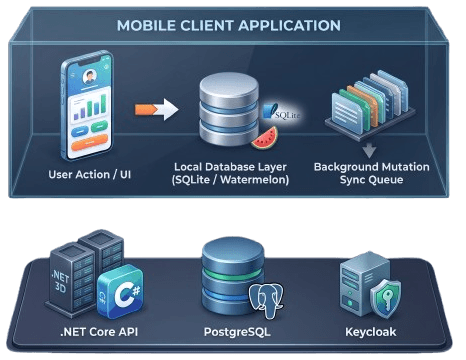
Key Pillars of Our Offline-First Architecture
- Embedded Local Storage: We leverage SQLite or robust reactive client databases (such as WatermelonDB or Realm) to store state locally. Data reads are instantaneous because they hit local storage, not remote HTTP endpoints.
- Transactional Mutation Queue: Every user action (e.g., submitting an inspection report, updating stock counts) is wrapped into an idempotent payload and written to an outbound persistent queue.
- Deterministic Conflict Resolution: When cellular coverage returns and queued payload batches sync to the backend API, conflicts can occur. We implement domain-specific conflict resolution rules (such as Server-Wins for master pricing, or Last-Write-Wins with vector clocks for field notes) to guarantee data integrity across devices.
- Resilient Retry & Exponential Backoff: Network sync workers dynamically pause, batch, and retry outgoing requests without consuming excessive battery life or overwhelming central backend services.
Chapter 3: Secure API Integration with Core Infrastructure
An enterprise mobile application is only as strong as its connection to your core API layer. Connecting cross-platform mobile apps to backend .NET or Node.js services requires enterprise-grade identity management and secure communication patterns.
Enterprise Mobile Security Stack
| Security Layer | Implementation Standard | Direct Software Best Practice |
|---|---|---|
| Identity & SSO | OpenID Connect / OAuth2 via Keycloak | Centralized single sign-on across web and mobile using Keycloak identity providers. |
| Token Storage | iOS Keychain / Android Keystore | Hardware-encrypted vault for storing short-lived JWT access and refresh tokens. |
| Local Access | Biometric Auth (Face ID / Fingerprint) | Unlocking locally stored session tokens without requiring re-entry of credentials. |
| Network Security | TLS 1.3 & Certificate Pinning | Preventing Man-in-the-Middle (MitM) attacks by validating backend certificate public keys. |
| Data at Rest | SQLCipher Encryption | Full database-level 256-bit AES encryption for all data cached on the device. |
On smaller screens, scroll horizontally to compare the security layers.
When a field worker opens the mobile app, biometric verification instantly unlocks the encrypted hardware keystore. The app retrieves the refresh token, requests a fresh JWT from our central Keycloak identity cluster, and establishes authenticated communication with core REST/GraphQL endpoints—all within milliseconds.
"Security in mobile enterprise software cannot rely on simple session cookies. We enforce hardware-backed token security and strict certificate pinning on every API request. If a device is lost or compromised in the field, access is revoked centrally in Keycloak within seconds."
— Brian Timmermans, Direct Software
For related guidance, read how we build security into software architecture and visit our Security & Trust page.
Chapter 4: Hardware Integration & External Peripherals
Industrial and field operations rely heavily on physical hardware peripherals. A mobile app designed for warehouse logistics or field service must interact smoothly with device sensors and external hardware accessories.
Direct Software specializes in integrating device hardware directly into business logic:
- High-Speed Industrial Barcode & QR Scanning: We implement dedicated hardware scanner SDKs (e.g., Zebra, Honeywell) alongside camera-based computer vision parsing for rapid inventory counting and asset management.
- Thermal Receipt & Label Printing: Bluetooth Low Energy (BLE) integration with portable Zebra and Brother printers for instant on-site printing of work orders, shipping labels, and receipts.
- GPS Location & Geofencing Logging: Background location services that automatically log arrival times at job sites and verify that maintenance reports are submitted within physical site boundaries.
- Photo Proof-of-Delivery & Damage Capture: Native camera capture with automatic image compression, EXIF metadata extraction (timestamp, GPS coordinates), and digital signature capture attached directly to the audit log.
Chapter 5: Cross-Platform Framework Selection: React Native vs. Flutter vs. Native
One of the most strategic decisions in custom mobile app development is selecting the underlying technical framework. Building separate native iOS (Swift) and Android (Kotlin) codebases doubles development costs and maintenance overhead. For enterprise software, modern cross-platform frameworks deliver near-native performance while sharing up to 90% of code.
Framework Evaluation Matrix
| Criterion | React Native | Flutter | Native (Swift / Kotlin) |
|---|---|---|---|
| Development Velocity | Very HighShared TS logic with web apps | HighSingle Dart codebase | ModerateDual codebases required |
| Code Reuse with Web | HighShares TypeScript, React models, state | LowSeparate Dart ecosystem | None |
| UI Customization | Uses native OS UI components | Custom pixel-rendered Canvas engine | 100% Native OS controls |
| Peripheral & Plugin Ecosystem | ExtensiveVast enterprise npm ecosystem | StrongGrowing pub.dev registry | Complete native access |
| Long-Term Maintenance | OptimalFor web/cloud tech stacks | Good for standalone brand experiences | High ongoing maintenance effort |
On smaller screens, scroll horizontally to compare all three frameworks.
At Direct Software, we primarily leverage React Native with TypeScript. Because we build scalable backends in .NET Core and web applications in React, React Native allows our architecture teams to share data models, API client libraries, validation logic, and state management patterns across both web and mobile platforms. This drastically reduces total cost of ownership and accelerates feature releases.
For more on our integration work, see our page on system integration.
Chapter 6: Enterprise Deployment, MDM, and OTA Update Strategies
Deploying an enterprise mobile application differs significantly from launching a consumer app. While some B2B/B2C self-service apps are published to the public Apple App Store and Google Play Store, internal field force applications require enterprise distribution mechanisms.
1. Internal Mobile Device Management (MDM) Distribution
For corporate-owned devices or strict BYOD (Bring Your Own Device) environments, we package applications for distribution via Enterprise MDM solutions such as Microsoft Intune, VMware Workspace ONE, or Jamf. Bypassing public store reviews allows instant deployment of internal tools to corporate app stores.
2. Over-The-Air (OTA) Updates for Rapid Hotfixes
Waiting days for app store review cycles during critical bug fixes is unviable for core business operations. Using modern OTA update infrastructure (such as Expo Updates), we push critical JavaScript bundle fixes and UI updates directly to user devices over the air—bypassing app store review queues entirely while maintaining complete security compliance.
Partnering with Direct Software for Your Mobile Strategy
Building an enterprise mobile application is an architectural investment. It requires a deep understanding of cloud APIs, offline synchronization, mobile security, and field workforce requirements.
At Direct Software, we don't just write mobile code—we design, build, and maintain end-to-end software systems that power your business forward. Whether you need an offline-first field service application, a B2B ordering portal, or a custom inventory scanning system integrated into your ERP, our remote engineering network delivers scalable, high-performance solutions engineered to industry best practices.
Ready to modernise your mobile workflow? Explore how Direct Software can architect your next custom mobile solution.